Most home-automation writing stops at "use Zigbee, avoid cloud". This is the actual bill of materials of one installation, which differs from the shopping list in one important way: it includes the verdicts, after living with each part. Some we would buy again tomorrow. Some we keep out of stubbornness. One we keep because throwing it away would mean admitting something. Numbers as of writing: Home Assistant 2026.9, 1,623 entities, 177 automations, roughly 65,600 lines of our own code and configuration, two dwellings.
The brain
Home Assistant Green. 4 GB RAM, 28 GB eMMC. It runs the whole thing comfortably, but both numbers are the actual constraint on what else can live here, and both have bitten.
- The 4 GB fills to about 2.4 GB used at idle, measured on the host across the OS, supervisor, core and add-ons, before any diagnostic tooling. When it runs out, the kernel swaps to eMMC and everything crawls. The tell is specific: slow over the network, fast on the local API usually means swap, not an application fault.
- The 28 GB is shared by the database, backups and add-ons. One runaway automation wrote 6.4 GB of log events overnight and filled it. A package-manager cache quietly held 2.7 GB for months.
Zigbee
Zigbee2MQTT 2.14 with a ZBT-2 coordinator. 32 devices: 18 routers, 14 end devices. Twenty of the 32 are IKEA, and the count grows by one most months.
The ZBT-2, honestly
Day to day it is a good, stable coordinator, the mesh runs for weeks without a
thought, and none of the incidents elsewhere on this site trace back to it. It has one
documented fault worth knowing about: occasionally it throws ASH_NCP_FATAL_ERROR
and drops the network until it is restarted.
What makes this worth reporting rather than shrugging at: the fault appeared on two separate ZBT-2 dongles. Same symptom, different physical unit. That rules out a bad sample and points at what both units share: the firmware, or, as a reviewer correctly noted, the host's USB path and its driver, which this test cannot separate.
Firmware remains the favourite (USB power and the disk were ruled out before the second dongle went in), and the planned upgrade below doubles as the experiment that settles it, which is the good news either way, because firmware is fixable, whereas a hardware fault would mean the model is just bad.
Next step here: a coordinator firmware upgrade is planned, and this page will be updated with whether the fault goes away. If you run a ZBT-2 without ever seeing this error, nothing is wrong with yours, it is intermittent, weeks apart, and recovers with a restart.
IKEA as the backbone: boring, and that is the point
INSPELNING and TRETAKT smart plugs, TRADFRI bulbs, VINDSTYRKA air sensors, all mains powered, so all routers. That is what makes the mesh: most of the routers here are IKEA, bought for other reasons, quietly holding the network up.
The end devices are the same story: PARASOLL door contacts, VALLHORN motion, BADRING water leak, RODRET dimmers. Cheap, dull, and none of them has been the cause of an incident on this page. The VINDSTYRKA in particular does more than its price suggests, its particulate channel turned out to be a reliable cooking detector, which is not what it was sold as.
Aqara: works, but it is picky about company
One LUMI device here (a water sensor) among 32. Aqara end devices are known for choosing a parent router and then dropping off if that parent is not to their taste, and non-Xiaomi routers frequently are not. If your mesh is built from another brand, expect this to be the device that mysteriously goes offline. It is not a reason to avoid them, it is a reason to pair them near the coordinator and watch them for a week.
Tuya: the local setup with a cloud renewal clause
Several Tuya-based plugs, controlled locally. Local control needs a per-device key, and that key changes every time the device is re-paired, after a factory reset or a Wi-Fi change. The only way to retrieve the new one is the vendor's cloud API.
So the cloud account has to be kept alive indefinitely, unused, purely so that local-only operation stays recoverable. Delete it and the next reset makes the device uncontrollable, local network or not.
The two meshes, photographed
Both networks, as their own tooling draws them. The interesting part is not either picture, it is that the two tools choose to show you different things.
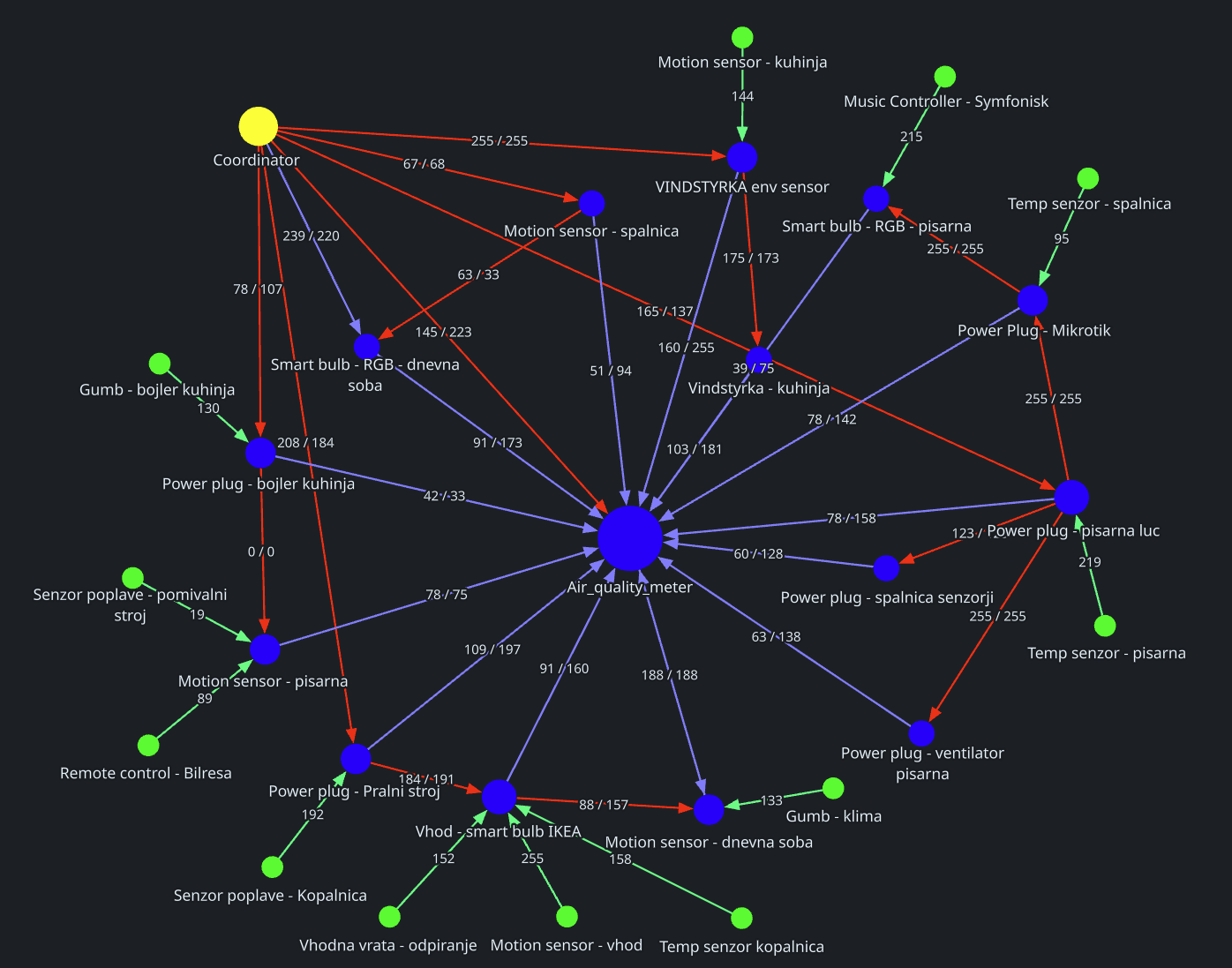
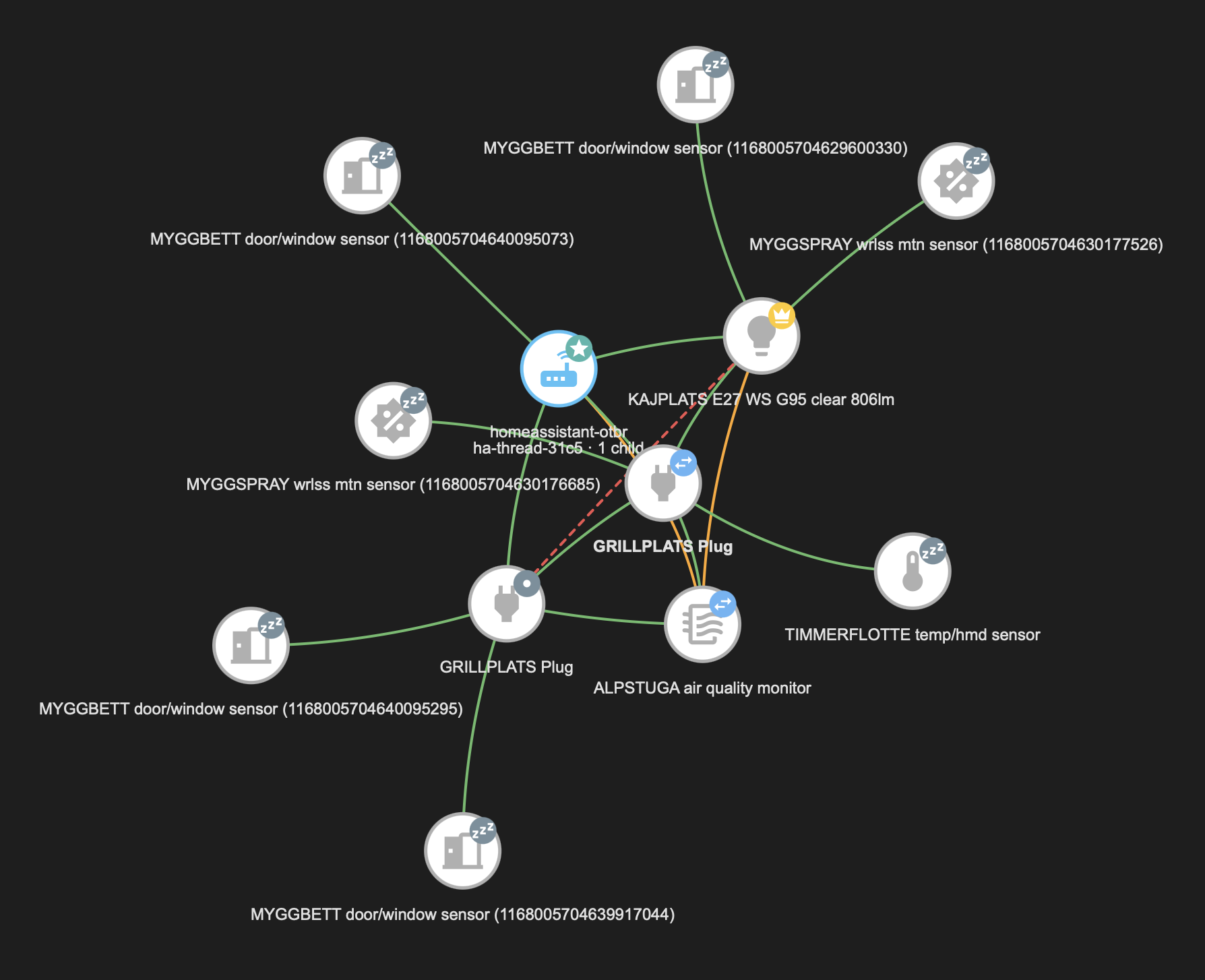
zzz badges are sleepy battery devices that wake to
report and vanish.Thread and Matter
Both in use, with one strong preference: Matter-over-Thread rather than Matter-over-Wi-Fi (a sentence in which the word "over" was quietly doing two different jobs, and on reflection deserved untangling), and the reason is not radio, it is your network. If your IoT devices sit on their own VLAN (which is standard advice, and correct) then Matter over Wi-Fi has to cross that boundary, and it relies on multicast DNS, which does not.
Thread devices reach the controller through a border router and sidestep most of the problem: the border router itself still advertises the devices over mDNS on the infrastructure side, so it has to sit on, or be reflected into, the controller's segment. Reflecting for one border router beats reflecting for every bulb.
Solving it the other way needs an mDNS reflector between segments, and plenty of consumer routers do not have one. The workaround here is a small avahi container doing nothing but reflecting.
Infrared: the honest failure
A Broadlink RM4 mini driving an air conditioner through SmartIR, with the remote captured by hand. It works, and it is the single most dangerous device in the house from an automation standpoint, because infrared is one-way. The system knows what it sent, never what happened.
Worse, on this handset the captured off command is a power toggle, the same frame for on and off. An automation written to guarantee the air conditioning was off
in an empty flat started it instead, for four hours.
The full post-mortem is here. If you automate IR, verify the
power command against a known toggle frame, and pair every command with an independent sensor
that can confirm the outcome. Ours is now a tilt sensor glued to the louver, which turned the
honest failure into a closed loop; the section title stays, as a
memorial.
Appliances: one excellent, one hopeless
| Dishwasher | Washing machine | |
|---|---|---|
| Appliance's own path | Local WebSocket on the LAN | Vendor cloud only |
| Second, local path | A metering smart plug, on both | |
| Detail from the appliance | Programme, phase, progress, remaining time, salt, rinse aid, faults | Cycle counters, selected options |
| Works with the internet down | Yes | Yes, via the plug, not the appliance |
| Verdict | Excellent, but a manual, unofficial install | Cloud unreliable; the plug carries it |
The dishwasher's local integration is genuinely good and gives more than the vendor's own app. It also once hung Home Assistant's startup: unreachable while nobody was home, its connect loop was registered as a tracked task, so the startup phase waited for it, timed out, and abandoned the webhook and push registrations that were still finishing. Every notification path went quiet, silently, and only while away. The fix was one word, a background task instead of a tracked one.
The washer, an AEG L9WAN61BCE, has no local API at all; a promising-looking library turned out to be for portable air conditioners. Its cloud reports the appliance as Off mid-cycle, because it disconnects and the last known state keeps being served. We eventually listened to an entire wash at the router to find out exactly what it says to its maker, and the answer, in the end, was a door rather than a wall.
The metering plug does most of the job anyway
This is the part worth taking away, because it applies to any appliance a vendor has decided not to open up. A smart plug that measures power, not just switches, recovers most of what the missing API would have given:
- Running or not, from the current draw, with hysteresis. This is more truthful than the appliance's own status: the plug can be switched on while the machine sits idle, and the cloud can claim Off while the drum is turning.
- Cycle boundaries and energy per cycle, which is what a “finished” notification actually needs.
- Wear, months before failure, with caveats. With volts and amps as well as watts you get the power factor. On a plain induction motor a drying run capacitor drags it down early; a worn bearing pushes it the other way and belongs in energy-per-cycle instead; and an inverter-driven appliance shows the wall its rectifier, not its motor. So treat the ratio as a per-programme fingerprint whose drift means "something changed", not as a bearing diagnosis. Watts alone still show nothing until the day it dies.
So the honest verdict is not “the washer is unautomatable”. It is that the appliance's own interface is decoration, and a metering plug (a few euros, no vendor account, works with the internet down) carries the automation instead.
Air quality
IKEA VINDSTYRKA units for particulates and VOC, plus a formaldehyde-capable meter and a Qingping monitor at the second property. Two lessons worth passing on:
- Particulates and VOC disagree usefully. Cooking raises both. One specific indoor activity raises formaldehyde while particulates stay flat. Selectivity came from the shape of the signature, not from an expensive sensor.
- The Qingping answers only its own subnet. Ping works, the port is open, packets demonstrably arrive, and the application-level query gets no reply, because it checks the source address. Reaching it across a VPN needs source NAT on the far router, scoped to that one device.
Audio and video
A 2010 Sony Bravia, a Cambridge Audio CXN100, a Chromecast. The television has
no modern control API, the only open port serves a DLNA renderer descriptor, so the
integration is dlna_dmr and availability is the power signal:
reachable means on, unavailable means standby.
The audio link only establishes when the television itself wakes the amplifier. So the automation's entire action is to turn the amplifier off and wait for the TV to wake it. Every attempt to improve that by adding a power-on made it worse.
Network
- MikroTik RB750GL, RouterOS 6. No REST API on this version, automation goes through the binary API on port 8728, which works fine and is barely documented. Its web interface served a certificate that had been expired for over two years before anyone looked.
- ASUS RT-AX52. Stock firmware has no persistent script hook, and any Apply in the web UI wipes hand-added firewall rules and routes. Merlin is not an option on this chipset. Everything it needs is therefore re-applied by a reconciliation loop every ten minutes, forever.
- 2× TP-Link TL-SG108E. Managed switches with no real API; control is a UDP protocol reverse-engineered by the community. It works, has no session limit, and the web UI's polling errors are noise to be ignored.
The one subscription worth paying for is free
healthchecks.io. Three heartbeats, the automation platform and a router at each site, pushed outward on a timer. If one stops arriving, an external service raises the alarm. It is the only alert path that survives the house being dead, because it is the only one not running inside it. Free tier, five minutes to set up, and it changes what the system is capable of noticing at all.
Since August: the things that arrived while this page was not looking
A bill of materials is a snapshot, and a household with a soldering iron and a delivery address is not a still subject. The following turned up in September and have already earned their entries.
- A 3.5-inch touch display in the living room, running an open display firmware over MQTT. It shows the house spirit's face, its mood and its thoughts in a font readable from the couch, dims by room illuminance, goes dark when nobody is there, and had to be talked out of showing its IP address on every boot. The best 20 euros on this page.
- Thermostatic radiator heads on all four radiators, paired over the mesh the hard way (mount first, calibrate, then pair). The plan was to feed them the room sensors we already own; the heads preferred their own thermometer and a correction, so each one now regulates on its internal sensor with an offset the house recomputes against the room sensor, while the house sets the target: day, night, nobody home, window open. Out of season they sit fully open and take a short walk once a week so the valves do not seize.
- A motorised projector screen on a mesh shutter switch with a broken bottom limit, calibrated by stopwatch to stop at picture height instead of the floor. See the audio page for the whole surprisingly satisfying story.
- A colour bulb of the spirit's own, switched from one protocol to the other with a ritual of power cycles, and still advertising for the job it left — see the ghost — breathing in the mood colour on every change, in a lamp that will wear a translucent head.
- A tilt sensor glued to the air conditioner's louver, which turned a one-way infrared remote into a closed loop. Cheapest acknowledgement in the flat. The loop.
- A subwoofer controlled over Bluetooth, with a loudness curve that has moved twice as the driver loosened up, and two decibels more whenever the air conditioner's fan is occupying the bottom octave.
- A blood pressure cuff that speaks the standard Bluetooth profile, refused to pair twice, and hands over readings anyway to a passive listener the moment its button is pressed. The house now knows the household's blood pressure, which is more than the household's doctor can say between visits.
- An HDMI matrix, four in, two out, with an eARC port that took the audio job away from the television and a remote we taught the house one button at a time. Two sources, two screens, four scenes and an End. The audio page has grown a matrix.
- A metering plug under the projector, never switched off, whose only job is to witness the thirty seconds after the on-code and say whether a 2008 lamp actually struck.
- An air purifier with a local interface, switched on by the indoor smoke detector from the detection page, by cooking, or by the room's own particulate sensor, and regulated on the trend rather than the level: up a step when the air worsens, down when it clears, straight to the quiet step when it is already clean, and full speed only when nobody is in the room to hear it. Off again twenty minutes after the air is clean.
- A Thread temperature sensor for the back room, and a second two-rocker button for the scenes above.
- A thumb-sized ESP32 board by the bed, running ESPHome: a Bluetooth proxy by trade and, since the night described on the cuff page, the cuff's own reader, because a board that does the handshake locally beats a server that does it over Wi-Fi. Its red power light cannot be switched off by any software on Earth; see the field guide.
Verdicts, in the spirit of this page: buy the display, buy the tilt sensor, buy the cuff if you already own the arm, and buy the matrix the day you own a second screen. Buy the small board, and give it one job rather than two. The radiator heads are fine once you stop arguing with their thermometer. The purifier is quieter than the argument about which speed it should run at. The bulb ritual is not a feature, it is a rite of passage.
What we would buy again, and what we would not
| Again | Reluctantly | No |
|---|---|---|
| IKEA mains-powered anything, the mesh builds itself VINDSTYRKA, outperforms its price and its stated purpose Bosch with the local integration Smart plugs with current metering, the most useful sensor per euro in the house |
ZBT-2, good and stable day to day; one intermittent firmware fault, upgrade
pending, verdict to be updated Tuya, fine locally, as long as you never delete the cloud account Aqara, good hardware, fussy about its parent router |
Any appliance whose only interface is a vendor cloud Infrared for anything that matters, unless you can measure the result The 4 GB box, if you intend to debug it while it runs |
The general rule that fell out of all this: buy the thing with the boring radio and the open protocol, and be suspicious of anything whose best feature is the app.
What we did not buy, with reasons
A smart safe, with an app and a lock and notifications and twelve kilograms of mass. It has no burglary rating at all, which makes the app a way of being informed promptly that your jewellery has left. A certified safe bolted into concrete with a cheap vibration sensor taped to the outside does the same job in the home platform and a much better job as a safe.
Three blood-pressure cuffs, compared not by accuracy first but by whether they speak the standard Bluetooth profile. One does, and can be read by a microcontroller on the sofa, as the existing one is. One is clinically the best of the three and speaks a private protocol known only to its own app and a handful of patient volunteers with packet sniffers. One is cheap, speaks the standard, and has never been clinically validated by anyone, which for a device whose entire purpose is a number seemed disqualifying. We chose the boring one.
And the fitness watch, which the household would like to read without the maker's cloud. The protocol has been reverse-engineered by volunteers and a library exists that streams the current numbers over Bluetooth to a computer, provided the watch is disconnected from the phone, because it holds one connection at a time. History still travels only as files, and nobody has written the file transfer yet. We are watching the project the way one watches a kettle.